WiFi signal strength meter Watch the signal. Catch the drop.
WiFiy shows your signal strength in dBm, second by second, and logs channel changes and drops as they happen.
Bars round off the number that matters.
The WiFi icon on your phone squeezes signal into three or four bars, so a connection that is fine for browsing and one that freezes every video call can look the same. Signal strength in dBm is the real number underneath, and small changes in it make a big difference.
Watching it live tells you where in the home the signal falls away, whether a wall or an appliance is to blame and whether a router move actually helped. It is the quickest way to tell a coverage problem from a line problem.
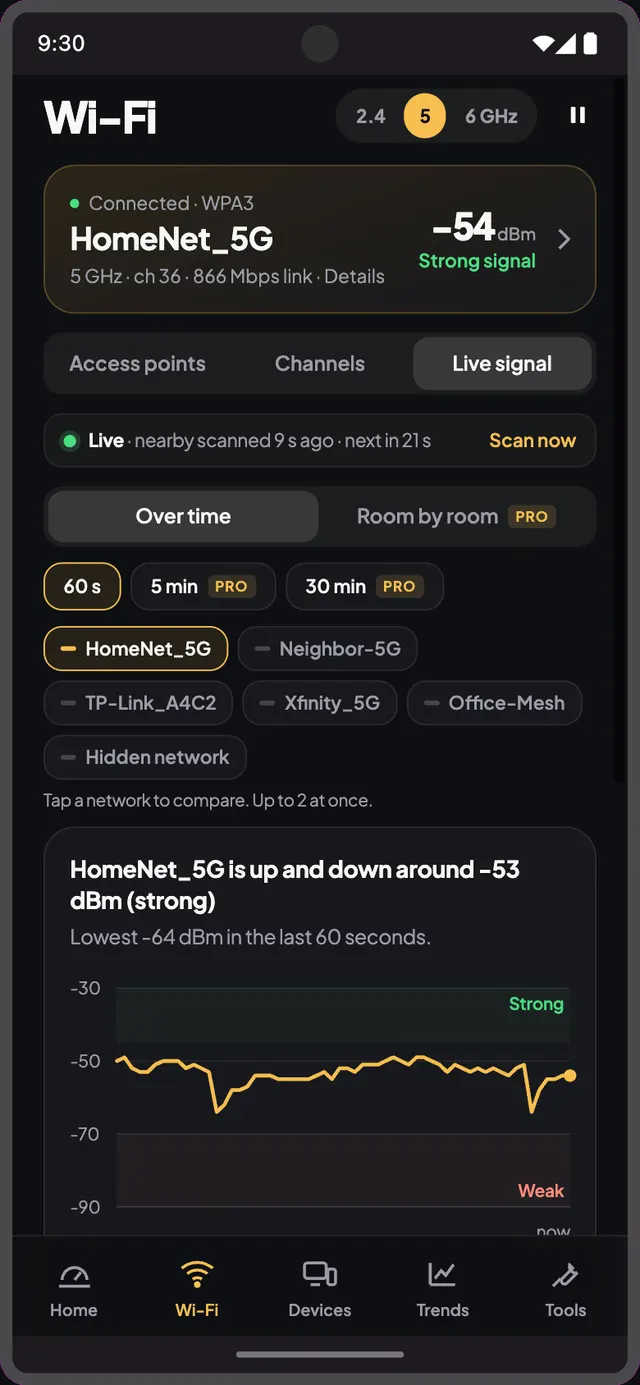
Three steps, about a minute.
Open Live signal
In the WiFiy tab, open Live signal. The graph starts straight away with your connected network’s strength in dBm.
Walk slowly
Move between rooms and let the number settle in each spot. Drops and channel changes are marked on the graph as they happen.
Compare and decide
Put two networks side by side, such as your 2.4 and 5 GHz bands, to see which one holds up where you need it.
What WiFiy shows you.
Reading dBm
- Better than −60 dBm: good for calls and 4K
- Around −70 dBm: borderline
- Around −80 dBm: calls freeze and pages stall
Free and Pro
- 60 seconds of live signal, free
- 5 and 30 minute history on Pro
- Room check with saved spots on Pro
Alongside the graph
- Every access point with its own 30-second line
- Channel, width, security and WiFi standard
- Your network updates every second
What each phone allows.
Android
Live signal in dBm, two networks side by side, and every access point around you.
iPhone
Apple doesn’t let apps read signal strength, so WiFiy shows how fast your router responds in milliseconds instead, which still rises where coverage gets weak.
Questions people ask
A person replies, usually within a couple of hours. The promise is one working day.
01What is a good WiFi signal strength in dBm?
Better than −60 dBm is good for video calls and 4K streaming. Around −70 dBm is borderline and you may notice drops. Around −80 dBm is usually where calls freeze and pages stall.
02Why is dBm a negative number?
dBm compares the received power to one milliwatt, and WiFi signals arrive far weaker than that, so the values are negative. Closer to zero is stronger: −55 dBm is better than −75 dBm.
03Is the signal meter free?
Yes, 60 seconds of live signal at a time is free, which is enough to walk a room or two. Pro adds 5 and 30 minute history and Room check, with a 3-day free trial.
04Can I measure WiFi signal strength on iPhone?
No app can read signal strength on iPhone, because Apple doesn’t allow it. WiFiy shows how fast your router responds instead, which tends to rise where the signal is weak.
05Why does my signal change when I stand still?
WiFi is radio, so people moving, doors closing and other networks all nudge it. A swing of a few dBm is normal; let the number settle for a few seconds before you judge a spot.
Scan your WiFi in thirty seconds.
Free on Android and iPhone. No account, no card.
Test your speed in the browserFree · no install · 15 s