The TV streams fine, but the smart plug won't finish setup and the back bedroom keeps buffering. Often the band is the problem.
Short answer: Use 5 GHz for devices near the router that need speed, like TVs, laptops, consoles and phones on video calls. Use 2.4 GHz for devices that are far away, behind several walls, or only support 2.4 GHz, like most smart plugs and bulbs. Intel rates 2.4 GHz at up to 100 Mbps and 5 GHz at up to 1 Gbps.
Which band wins in your back bedroom depends on your walls, not a chart. WiFiy measures it in about 30 seconds. Free, no account.

What's the difference between 2.4 GHz and 5 GHz?
The difference between 2.4 GHz and 5 GHz is range against speed. Your router sends both at once, as two radio bands. The lower band travels farther and gets through walls better. The higher band carries more data but fades faster.
| Point to Consider | 2.4 GHz | 5 GHz |
|---|---|---|
| Typical top speed (Intel) | Up to 100 Mbps | Up to 1 Gbps |
| Range through walls | Longer | Shorter |
| Channels that don't overlap | 3 (1, 6, 11 in the US) | Many more; the exact list depends on your country |
| Common interference | Microwaves, Bluetooth, neighbors' WiFi | Other 5 GHz networks; radar on DFS channels |
| Best for | Smart home gear, far rooms | TVs, laptops, consoles, calls near the router |
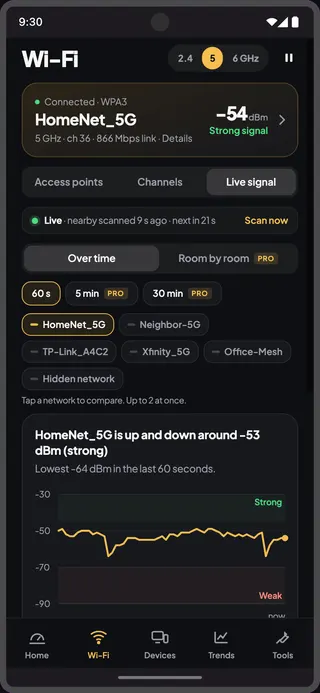
Signal is measured in dBm (decibel-milliwatts). Numbers closer to zero are stronger. On WiFiy's scale:
| Signal | What it means | What to do |
|---|---|---|
| Better than −60 dBm | Good | Use 5 GHz here |
| Around −70 dBm | Borderline | Test both bands |
| −80 dBm or worse | Failing | Use 2.4 GHz, or move the router |
A third band, 6 GHz, only works with WiFi 6E and WiFi 7 gear. Whether you can use it depends on your country and your devices.
Is 5 GHz faster than 2.4 GHz?
Yes, when you're close to the router. A few rooms away, often not. 5 GHz loses more strength through each wall and floor, and a weak 5 GHz link can be slower than a solid 2.4 GHz one.
Speed you don't need doesn't help, either. Netflix recommends 15 Mbps for 4K and 5 Mbps for 1080p. A steady 2.4 GHz connection often covers that in a far room.
A simple rule: if 5 GHz reads worse than about −70 dBm where you sit, run a speed test on each band and keep the faster one.
Your number is one scan away. WiFiy shows live signal in dBm on Android, free.
Which band should each device use?
Put devices that stream, game or make calls on 5 GHz. Put low-data and far-away devices on 2.4 GHz. In a typical home:
- 5 GHz: smart TV or streaming stick, laptop, games console, the phone you take calls on.
- 2.4 GHz: smart plugs, bulbs, sensors, many doorbells and printers, and anything at the far end of the house.
- Either: phones and tablets that move from room to room. Let them switch on their own.
Why won't my smart plug connect?
Most smart plugs and bulbs only support 2.4 GHz. If your router uses one network name for both bands, your phone may sit on 5 GHz during setup, and the plug can't follow it.
The usual fix: in your router admin page (often 192.168.1.1), find a setting called something like "Band steering" or "Smart Connect." Turn it off for a moment so 2.4 GHz gets its own name. Connect your phone to that name, finish setup, then turn the setting back on. Menu names vary by maker, and some ISP and mesh routers hide this option. If so, check the router maker's app.
Apple recommends the same name on every band, so switching back afterward is usually the better long-term setup.

How do I make 2.4 GHz work better?
You can't change the physics, but three settings help:
- Channel 1, 6 or 11. These are the only ones that don't overlap in the US. Much of Europe and Asia also allows 12 and 13. Pick only from the list your router shows for your country.
- 20 MHz channel width on 2.4 GHz. Apple's guidance, because wider channels overlap more neighbors.
- Router off the floor. Moving it to a shelf can gain around 10 dBm. Keep it away from the microwave.
Not sure which channel your neighbors crowd? On Android, WiFiy rates every channel one to five stars and shows how many networks share it. It's a guide, not a promise of more speed.
For a single dead room, see why your WiFi is slow in one room.
How to Check Which Band Works Best With WiFiy
Measure in the room that matters, change one thing, then measure again:
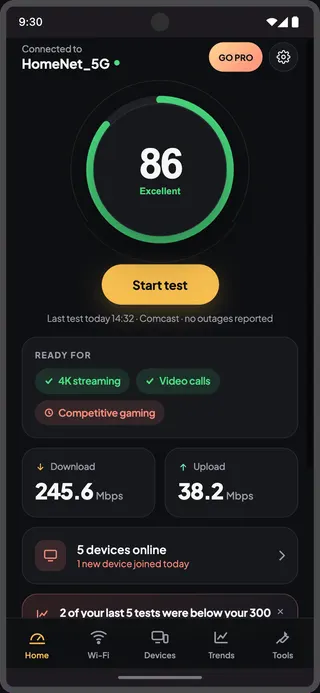
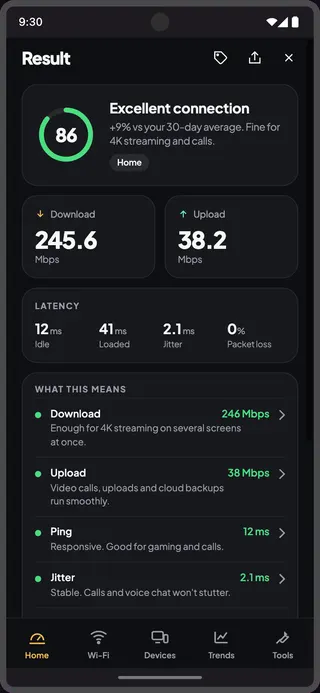
- Stand where the problem is. Open WiFiy and tap Start test on Home. Read the verdict and "What this means."
- Check the signal (Android). Open the WiFiy tab. With one network name, you'll usually see your network listed twice: once on a 2.4 GHz channel (1–13) and once on a 5 GHz channel (36 and up). Compare their dBm.
- Change one thing. Move a device to the other band, or try the channel with the most stars.
- Test again and check Trends to see whether it actually helped.
Channels and nearby networks need location permission while the app is open, because Android and iOS require it for WiFi data. WiFiy explains why before it asks.

On iPhone: iOS doesn't let any app read signal strength, channels or nearby networks. WiFiy still shows speed against your plan, router response time and trends. For channels, use your router admin page or the maker's app.
It takes about thirty seconds and costs nothing. Get WiFiy free: tap the Google Play or App Store badge. Or test your speed in the browser first, no install. (The browser test runs on M-Lab servers, which publish each result, including your IP address, as open research data.)
Your data stays yours. WiFiy needs no account and no card. Your test history stays on your phone. Location is used only while the app is open, and WiFiy never stores it. A real person answers a support email.
The Bottom Line
Near the router, 5 GHz usually wins. Far away or behind walls, 2.4 GHz often does, and smart home gear needs it anyway. Don't guess. Measure in the room, change one thing, and test again. WiFiy is free on Android and iPhone: tap the Google Play or App Store badge.