A good internet speed covers everything your household does at once, with room to spare. For a busy home, about 100 Mbps download and 20 Mbps upload is a sensible target, and it matches the FCC's fixed-broadband benchmark. One 4K Netflix stream needs 15 Mbps, so what counts is how many things run at the same time.
Picture a four-person home at 8 pm. One person streams in 4K, one is on a video call, one is gaming, and the call freezes. The plan says 100 Mbps, so whether the cause is the plan, the WiFi or the router is anyone's guess.
Now you know what good looks like. Your own number is one scan away: WiFiy runs a speed test in about 30 seconds, free, with no account.
What do download, upload and ping mean when you judge "good"?
Three numbers decide whether a connection is good. Download is how fast data reaches your devices. Upload is how fast your devices send data out. Both are measured in Mbps (megabits per second). Ping, also called latency, is the round-trip delay in milliseconds (ms), and it decides how responsive calls and games feel.
Calls and backups lean on upload, and games lean on ping. For the room-by-room side, read why your WiFi is slow in one room.
What one device needs (as of November 2026)
| Activity | Speed needed | Source |
|---|---|---|
| HD video, 720p | 3 Mbps | Netflix |
| Full HD video, 1080p | 5 Mbps | Netflix |
| 4K video | 15 Mbps | Netflix |
| Video call, 1080p one-to-one | about 3.0 Mbps down, 3.8 Mbps up | Zoom |
| Cloud gaming (Xbox) | 10–20 Mbps down | Microsoft |
| Online multiplayer game | a few Mbps; low ping matters more | Console makers |
Video figures come from Netflix's recommended-speeds page. Call figures come from Zoom's system requirements.
What is a good internet speed for home?
Add up what runs at the same time in your busiest hour, then add headroom. Two 4K streams (30 Mbps), one 1080p call (about 3 Mbps down) and one cloud game (20 Mbps) come to about 53 Mbps of download, plus roughly 4 Mbps of upload. A 100 Mbps plan covers that with room left for phones and updates.
The FCC raised its fixed-broadband benchmark from 25/3 Mbps to 100/20 Mbps in March 2024. That is a policy definition, not a rule for what your home needs, and other countries use different figures. Many plans are sold as "up to" a speed, so the number on your bill is a ceiling, not a measurement.
Your plan is the ceiling, and Trends in WiFiy keeps every test against it so you can see the plan versus delivered over weeks. It is free on Android and iPhone.
What is a good internet speed for streaming?
Streaming needs 5 Mbps for 1080p and 15 Mbps for 4K per stream, according to Netflix. Multiply by the screens running together: three 4K TVs need 45 Mbps before anything else is online.
Buffering on a fast plan often points to the WiFi, not the line. A weak signal in the TV's room can drop below what a 4K stream needs, even when the plan is plenty.

What is a good internet speed for gaming?
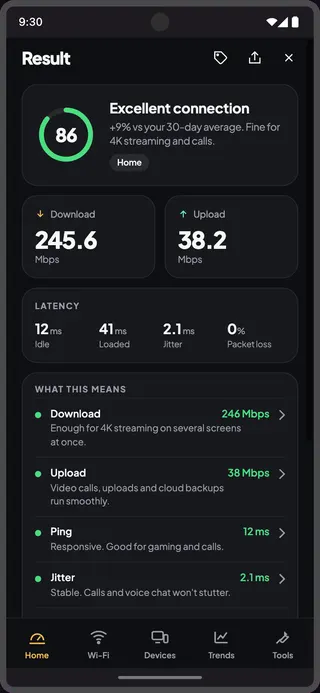
For online multiplayer, a good connection is a low-ping one, not a big one. Games send small packets, so extra Mbps barely help once you have a few. Ping, jitter (how much the delay varies) and packet loss (data that never arrives) decide whether play feels smooth.
Cloud gaming is different because it streams video to you. Xbox lists 10 Mbps as the minimum and 20 Mbps for best results on consoles, PCs and tablets [VERIFY]. More Mbps beyond that does not cure lag. WiFiy's speed test shows ping, jitter and packet loss beside download and upload, on Android and iPhone.
Why does my speed test read lower than my plan?
A low test has three possible causes: the WiFi, the router or your provider's line. Test next to the router, ideally on a cable or at 1 m. If the result matches your plan there, the line is fine and the loss happens between the router and the room. If it is low there too, restart the router and test again.
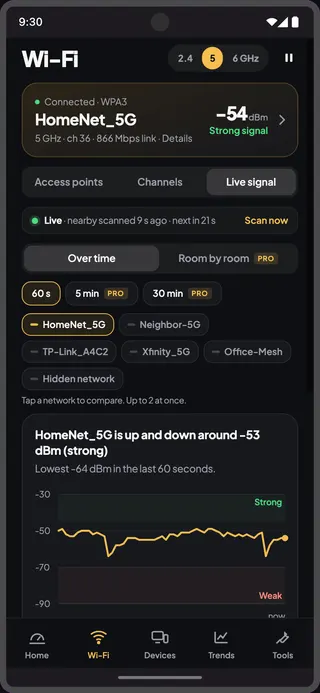
One phone can't prove which side is at fault, so treat one test as a clue and several tests over days as evidence. On Android, moving a router from the floor to a shelf can gain around 10 dBm (dBm is signal strength; closer to zero is stronger).
Evening-only slowdowns can point to peak-time congestion, which nightly tests in WiFiy Pro (3-day free trial) catch. If tests next to the router stay far below your plan, the free WiFiy report turns them into one page your provider can read. Check your contract for what the plan commits to; this isn't legal advice.
How to Check Your Internet Speed With WiFiy
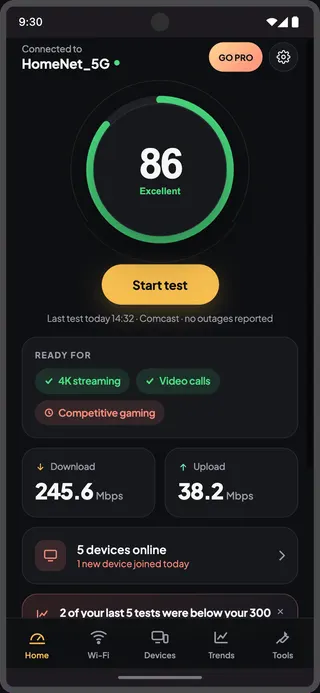
- Stand next to the router, or plug a laptop in with a cable. Open WiFiy and tap Start test on Home.
- Read the verdict. Download, upload, latency, jitter and packet loss are judged against your plan, and "What this means" explains each number.
- Walk to the room that struggles and test again. A big gap means a WiFi problem, not a plan problem.
- Change one thing: lift the router off the floor, reboot it, or on Android open the WiFiy tab to see channel ratings in stars. Test again and check Trends.
The speed test needs no location. Channel stars do, only while the app is open, because Android and iOS require it for WiFi data. Why WiFiy asks is explained before the prompt.

iPhone: WiFiy can't show signal strength, channels or nearby networks, because iOS doesn't allow it. The speed test, router response time, Devices, Trends and the WiFiy report all work.
No app? The browser speed test takes about 15 seconds with no install. It runs on Measurement Lab servers, which publish each test, including your IP address, as open research data.
It takes about thirty seconds and costs nothing. Get WiFiy free on Google Play or the App Store: tap the badge below.
What to know before you install. No account, no card. History stays on your phone. Location is used only while the app is open, and WiFiy never reads GPS or stores your location. A person answers a support email. The WiFiy report never includes your location, WiFi password, MAC addresses or public IP, and it expires after 7 days. WiFiy measures and explains; it can't make your WiFi faster.
What counts as good: your number, not the plan's
A good internet speed is one you can measure: about 100 Mbps down and 20 Mbps up for a busy home. Test beside the router, test in the room that struggles, then change one thing and test again. Get WiFiy free on Google Play or the App Store. No account, about thirty seconds. More plain-language guides are on the WiFiy blog.