Your WiFi can be slow with full bars because the bars only show how strongly your phone hears the router. They don't show how crowded the channel is, how busy the router is, or how fast your provider's line is. Run one speed test next to the router. That tells you which one to fix.
Picture a typical workday (an illustration, not a real customer): four bars on your phone, a 9:30 stand-up, and your face freezes mid-sentence. Your provider says the line looks fine. The router light is green.
This guide separates the usual causes: the WiFi, the router, the provider's line, or the phone itself. For every slow-WiFi symptom in one place. If only one room is slow, start with why your WiFi is slow in one room.
What Full Bars Actually Measure
Full bars measure signal strength: how loud the router sounds at your phone. Speed depends on more than that. A loud signal on a crowded channel is like a clear voice in a packed room. You're heard, but you wait your turn.
Signal strength is shown in dBm (decibel-milliwatts). The numbers are negative, and closer to zero is stronger. Phone makers draw bars differently, so the dBm number is the one to trust.
| Signal (dBm) | WiFiy verdict | What it handles |
|---|---|---|
| Better than −60 | Good | Video calls, 4K streaming |
| −60 to −70 | Borderline | Browsing and HD; calls may stutter |
| −70 to −80 | Weak | Basic browsing; drops likely |
| Worse than −80 | Failing | Frequent drops |
Scale: WiFiy's signal bands.
Most of what you do needs less speed than you'd think:
| Activity | Speed needed | Source |
|---|---|---|
| Zoom 1:1 call, 720p HD | About 1.2 Mbps up and down | Zoom system requirements |
| Netflix HD (720p) | 3 Mbps | Netflix Help Center |
| Netflix Full HD (1080p) | 5 Mbps | Netflix Help Center |
| Netflix 4K | 15 Mbps | Netflix Help Center |
Netflix recommends 15 Mbps or higher for 4K. So if a call freezes on a 300 Mbps plan, raw speed is rarely the problem. The usual culprits are latency (delay), jitter (how much that delay jumps around) or packet loss (data that never arrives).

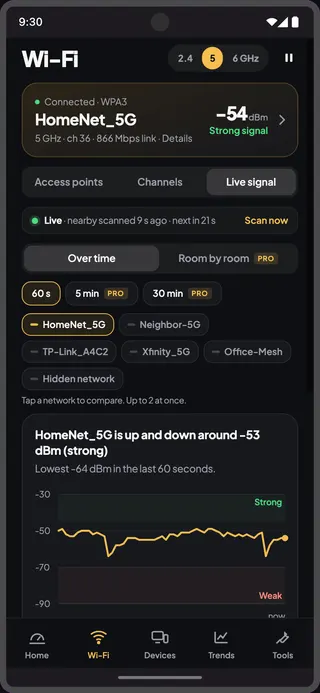
Your own number is one scan away. WiFiy shows live signal in dBm on Android and router response time on iPhone. It's free, with no account.
Is It Your WiFi, Your Router or Your Provider?
Test in two places and compare. A speed test about 1 m (3 ft) from the router shows what reaches your home. A test where you work shows what survives the trip.
| Next to router | Where you work | Likely cause | Next step |
|---|---|---|---|
| Slow | Slow | Provider's line or router | Restart the router, test again |
| Fast | Slow, signal good | Crowded channel or interference | Check your channel |
| Fast | Slow, signal weak | Coverage | See the one-room guide |
| Fast | Other devices fast, your phone slow | The phone | Check phone settings |
One phone can't prove everything. For the cleanest check, plug a laptop into the router with a cable and test. If wired is slow too, the WiFi isn't your problem.
5 Reasons WiFi Is Slow With Full Signal (and How to Fix Each)
1. Your channel is crowded
A crowded channel slows WiFi even at full signal, because networks on the same channel take turns to talk. Apartment blocks are the worst case on 2.4 GHz.
On 2.4 GHz, US readers should use channel 1, 6 or 11, the three that don't overlap. Elsewhere, pick only from the channels your router lists for your country. A typical path is Router admin (often 192.168.1.1) → Wireless → 2.4 GHz → Channel; mesh and ISP routers often hide this setting.
If you're near the router, join the 5 GHz band instead. It has more channels and fewer neighbors, but shorter reach through walls.
WiFiy rates every channel one to five stars on Android and shows how many networks share it, then walks you through the switch. It's a guide, not a promise of more speed.
2. The router is overloaded
Every device on your network shares the router's airtime. A cloud backup, a game download or a 4K stream on another device can squeeze your call.
Restart the router by unplugging it for 30 seconds. Then check its own app or admin page for a firmware update, and pause big uploads during calls.
3. Your provider's line slows at peak time
If the test next to the router is fine at 9 am but slow at 9 pm, the provider's line may be the cause. Shared capacity in your area fills up in the evening.
In the US, FCC broadband labels list your plan's typical download, upload and latency. Compare your tests to that label. This isn't legal advice; check your contract.
4. Your phone is the bottleneck
If your internet is slow on your phone but fine on other devices, look at the phone first. Common causes are a VPN, Battery Saver or Low Power Mode, or a phone stuck on a separate 2.4 GHz network name.
Turn the VPN off and test again. Forget the network, rejoin it, and compare with another phone in the same spot.
5. Connected, but nothing loads
"Connected, no internet" means your phone reached the router, but the router can't reach the internet. If every device fails, restart the modem and router, then check your provider's outage page.

How to Test WiFi Signal Strength and Speed With WiFiy
WiFiy runs the same two-spot check as above and tells you what each number means. It's a free WiFi signal strength test plus a speed test against your plan.
- Test next to the router. Open WiFiy and tap Start test on Home. Read the verdict against your plan.
- Test where calls freeze. On Android, open the WiFiy tab for live signal in dBm and the channel rating. On the iPhone, Apple doesn't let apps read signals or channels, so WiFiy shows how fast your router responds instead.
- Change one thing. Switch the channel, move the router off the floor, change band or turn the VPN off.
- Test again and check Trends. Trends show whether the fix helped. If the line is slow next to the router, share a free WiFiy report with your provider.
The WiFiy tab needs location permission while the app is open, because Android and iOS require it for WiFi data. WiFiy explains why before it asks (more in Support).
Not ready to install? The browser speed test takes about 15 seconds. It runs on M-Lab servers, which publish each test, including your IP address, as open research data.
It takes about thirty seconds and costs nothing. Get WiFiy free: tap the Google Play or App Store badge.
Before you download: No account, no card. Your test history stays on your phone. Location is used only while the app is open, and WiFiy never reads GPS. A WiFiy report never includes your location, WiFi password, MAC addresses or public IP. A person answers support email.
The Short Version
Full bars only mean your phone hears the router. Test next to the router, then where you work, and the gap names the cause. Change one thing, then test again.
Find your cause in thirty seconds. WiFiy is free on Android and iPhone, with no account.