You fire first and still lose the trade. Your teammate’s voice lands a beat late, and the game blames your connection. An hour ago, a speed test said 300 Mbps.
High ping means your data takes too long to make the round trip to a server and back. The delay comes from one of three places: your WiFi, your connection while it’s busy, or the route to the server. Under 50 ms feels responsive for most games and calls. Above 100 ms, you notice it.
Ping is not speed. A 300 Mbps plan can still lag if every packet waits in a queue. So the fix starts with finding which part is slow. WiFiy’s free speed test shows ping, jitter and packet loss next to your download speed, on Android and iPhone, with no account.
What Is a Good Ping?
A good ping for gaming and video calls is under 50 ms, and under 20 ms is excellent. Ping is measured in milliseconds (ms): the time a small packet takes to reach a server and come back. Low matters, and steady matters just as much.
| Ping (round trip) | What it feels like | Fine for |
|---|---|---|
| Under 20 ms | Instant | Competitive shooters, fighting games |
| 20-50 ms | Responsive | Almost all online games and calls |
| 50-100 ms | Slight delay | Casual games, calls, streaming |
| 100-150 ms | Noticeable lag | Calls still work; fast games suffer |
| Over 150 ms | Hard to play fast games | Streaming and browsing |
The gaming bands are a common rule of thumb, not a published standard. [VERIFY]
Video calls have a published bar. For good call quality, Microsoft’s Teams guidance sets a minimum target of round-trip latency under 100 ms, jitter under 30 ms and packet loss under 1% (Microsoft Teams network requirements). Jitter is how much your ping changes from moment to moment. A ping that swings between 20 and 90 ms feels worse than a steady 60. microsoft
This guide is part of [Why Is My WiFi Slow? The Complete Diagnosis Guide]([PILLAR URL]).
Why Is My Ping So High? Find the Slow Leg First
Your ping is the sum of three legs. The first is your device to the router. The second is the router out through your provider. The third is the provider to the game server. Fix the slow leg and leave the rest alone, because changing everything at once hides what worked.
| Leg | Typical sign | Quick test, no app | Usual fix |
|---|---|---|---|
| WiFi: device to router | Ping jumps around; fine on a cable | From a computer, run ping 192.168.1.1 (your router’s address) | Move closer, use 5 GHz, or run a cable |
| Busy line (bufferbloat) | Spikes only while someone streams or uploads | Check ping when idle, then during a big download | Turn on SQM on the router; pause big uploads |
| Route: provider to server | High on a cable too, worse at night | Compare a nearby server with the game’s | Pick a closer server region; contact the provider |

Is your WiFi the problem?
Test right next to the router first. If ping is low there and high in the back bedroom, the WiFi is the problem, not your plan. Over a good signal, a router usually answers in a few milliseconds. Tens of milliseconds that jump around point to a weak signal or a crowded channel.
Walls, floors and the busy 2.4 GHz band cause retransmissions, where damaged packets have to be sent again. Each resend adds delay. Lift the router off the floor, move the console or PC to 5 GHz if it’s within a room or two, or run an Ethernet cable. For one weak room, see why your WiFi is slow in one room.
Why does your ping spike when someone else is streaming?
That’s bufferbloat. When the line is full, your router holds too many packets in a queue, and game packets wait behind a cloud backup or a 4K stream. Ping looks fine in a quiet house, then jumps to hundreds of ms.
Research published in Communications of the ACM found that smart queue management (SQM) and traffic shaping kept delay low and steady even when the line was busy (Communications of the ACM). The same study found that ordinary QoS priority settings don’t reliably fix it, because other traffic still queues behind whatever gets priority. If your router offers SQM (sometimes labeled Smart Queue, CAKE or fq_codel), turn it on and set it a little below your measured speed. Menu names vary by router maker, so check its help page. acmacm

Is it your provider or the game server?
If ping is high on a cable too, the problem is outside your house. Distance sets a floor no router can lower. Light in fiber covers about 200 km per millisecond, so a server 1,000 km away adds roughly 10 ms of round trip before any detours. Evening congestion and indirect routing add more on top, which is why ping often climbs after 8 pm.
Pick the closest server region in the game’s settings. If ping is high to every server, every evening, that points to your provider. In the US, broadband labels show a typical latency for each plan, meaning the delay you should normally expect from the service (FCC broadband label glossary). You can compare your own tests with that figure. This isn’t legal advice; check your contract. fcc
Does a VPN lower ping?
Usually not. A VPN adds encryption and an extra hop, which generally raises latency. It may help only when your provider routes game traffic badly and the VPN’s path happens to be shorter. Test with and without it, and keep whichever number is lower. comparitech
How to Check Your Ping With WiFiy
WiFiy can’t lower your ping, and no app can. What it can do is show which leg is slow, so you change the right thing.
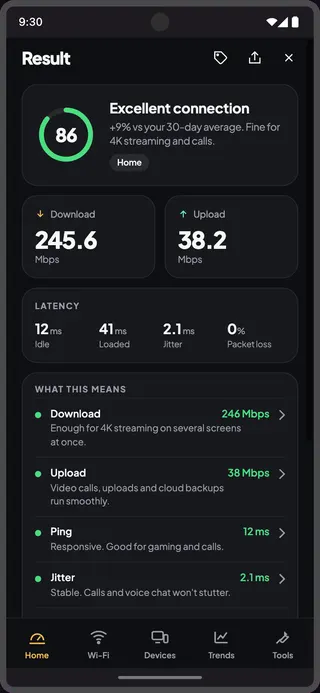
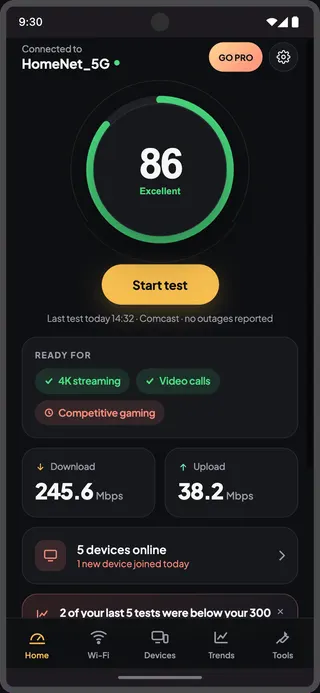
- Open WiFiy and tap Start test on Home. Read ping, jitter and packet loss. Tap any number for “What this means.”
- Test next to the router, then where you play. A big jump between the two results points to the WiFi.
- Pin one server so each test compares like with like. Three pinned servers are free.
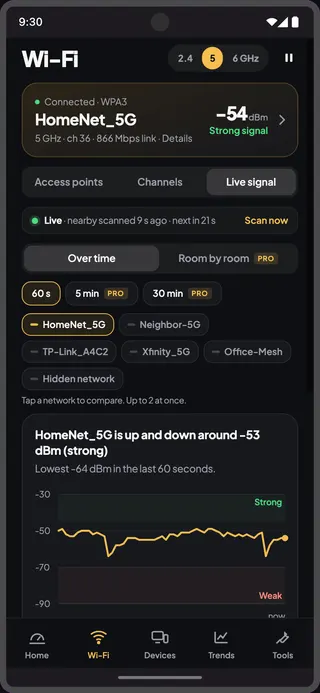
- Open Live signal in the WiFiy tab. On Android it shows signal in dBm (signal strength in decibel-milliwatts). On iPhone it shows router response time in ms, which isolates the WiFi leg. The first 60 seconds are free.
- Change one thing, test again, and check Trends. If ping is high every night, share a free WiFiy report with your provider.
Signal readings need location permission while the app is open, because Android and iOS require it for WiFi data. The Ping and Traceroute tools are Pro, with a 3-day free trial. The core test stays free.

It takes about thirty seconds and costs nothing. Tap the Google Play or App Store badge to get WiFiy free. Or test your speed in the browser first, with no install. Note that the browser test runs on M-Lab servers, which publish each test, including your IP address, as open research data.
What WiFiy does and doesn’t do
No account, no card. Your test history stays on your phone. Location is used only while the app is open, and WiFiy never reads GPS. The WiFiy report never includes your location, WiFi password, MAC addresses or public IP. A person answers a support email, usually within a couple of hours.
The Bottom Line
High ping usually lives on one leg. Test next to the router, test while the line is busy, and test on a cable. Fix only the leg that’s slow, then measure again to confirm. WiFiy is free on Android and iPhone, with no account needed. Tap the Google Play or App Store badge to start.