Who is on my WiFi Every device on your network, named.
Phones, TVs, smart plugs and the odd thing you don’t recognise. WiFiy lists them all, shows what is online now and helps you name the rest.
Most homes have more devices online than anyone counted.
Between phones, laptops, TVs, speakers, plugs, doorbells and the printer nobody uses, a typical home has far more devices on WiFi than people think. Every one of them shares the same connection, and an unfamiliar name in the list is the first thing that makes people worry about a neighbour on their network.
Usually the stranger is yours: smart devices often show up under the name of the company that made their WiFi chip. A device list that shows the maker, when each device was first and last seen, and lets you name what you know turns a worrying list into a short one.
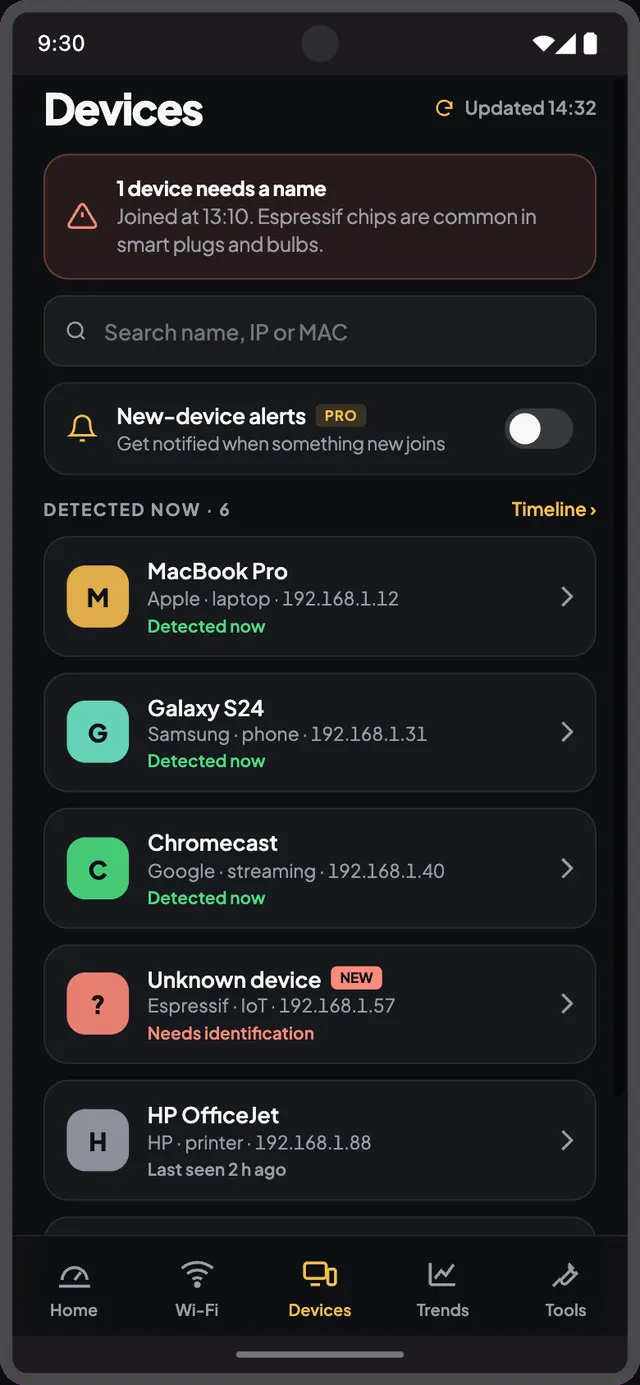
Three steps, about a minute.
Open Devices
WiFiy scans your network and lists every device it finds, with its name, maker and IP address.
Check the unknowns
Tap a device for its maker and first-seen time. Anything WiFiy can’t name is marked “Needs identification”, never “intruder”.
Name what you know
Give each device a name and type once. WiFiy remembers them, so the next new arrival stands out.
What WiFiy shows you.
What you see
- Name, maker and IP for every device
- Detected now, or when it was last seen
- Search by name, IP or MAC
What it doesn’t do
- It can’t see what devices are doing
- It never reads their traffic
- It doesn’t call anything an intruder
On Pro
- New-device alerts when something joins
- About every 15 minutes on Android, periodically on iPhone
- 3-day free trial in the app
What each phone allows.
Android
The full device list, naming, search and new-device alerts on Pro.
iPhone
The same device list and naming. New-device alerts run periodically, as iOS allows.
Questions people ask
A person replies, usually within a couple of hours. The promise is one working day.
01How do I see who is on my WiFi?
Open Devices in WiFiy. It lists every device it finds on your network with its name, maker and IP, and shows which are online now. You can also check the connected-devices page in your router’s admin.
02Can WiFiy see what other devices are doing?
No. It lists devices on your network with their name, maker and IP. It does not and cannot read their traffic.
03There is a device I don’t recognise. Is someone stealing my WiFi?
Usually not. Smart plugs, TVs and printers often appear under the chip maker’s name, and guests’ phones show as “Unknown maker”. Tap it for the maker and first-seen time. If you still can’t match it, change your WiFi password from Router admin.
04Does it work on iPhone?
Yes. The device list and naming work on iPhone too. New-device alerts on Pro run periodically, because iOS limits how often apps can check in the background.
05Will it tell me when a new device joins?
With Pro, yes. WiFiy checks about every 15 minutes on Android and periodically on iPhone, so an alert can arrive a few minutes after the device joins.
Scan your WiFi in thirty seconds.
Free on Android and iPhone. No account, no card.
Test your speed in the browserFree · no install · 15 s