Internet speed report for your ISP Proof for your provider.
A WiFiy report puts speed against your plan, signal, channel, devices and the last seven days on one page, with a plain line on the likely cause.
“It’s slow” is easy to dismiss. A page of results isn’t.
When you call support, the first questions are always the same: how slow, since when, on WiFi or cable, near the router or not. Without numbers the call goes round in circles, and you get told to restart the router.
A report answers those questions before they are asked. It shows the speed you pay for next to what you got, over several days, plus the signal and channel, so support can see straight away whether the problem is the line or the WiFi in your home.
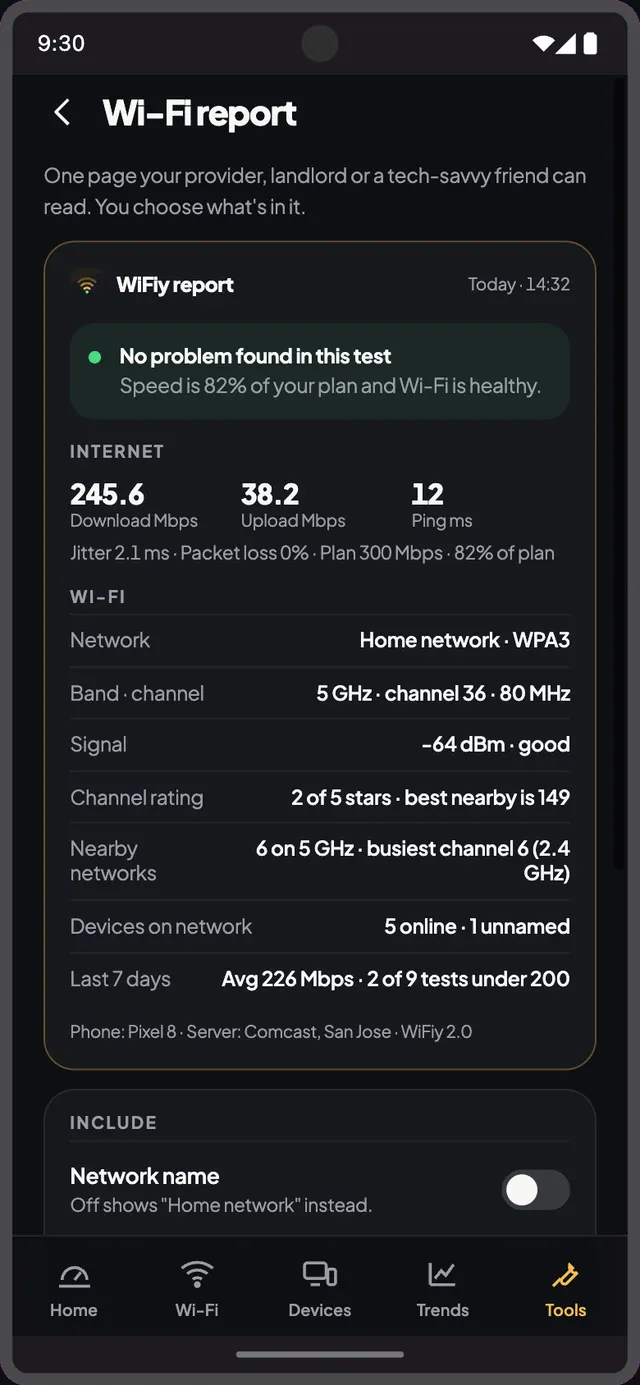
Three steps, about a minute.
Run a few tests
Test near the router and at different times of day. Trends keeps every result against your plan.
Make the report
Tap the share icon on a result, or go to Tools › Share WiFiy report. Pick what to include.
Send it
Share a link, an image, a PDF or a six-letter code. Anyone with the code can open it at wifiy.app/support.
What WiFiy shows you.
What’s in it
- Speed against your plan
- Signal, channel and devices
- The last seven days and a plain line on the likely cause
What’s never in it
- Your location or WiFi password
- MAC addresses
- Your public IP
How long it lasts
- Deleted after 7 days
- Or tap Delete now in the app
- Free on Android and iPhone
What each phone allows.
Android
The full report, including signal and channel.
iPhone
The same report without signal and channels, which iOS doesn’t let apps read.
Questions people ask
A person replies, usually within a couple of hours. The promise is one working day.
01How do I prove to my ISP that my internet is slow?
Test several times, at different times of day, with the phone near the router so WiFi coverage isn’t the cause. Then share the results with the speed you pay for alongside. A WiFiy report puts all of that on one page.
02What does a WiFiy report include?
Speed against your plan, signal, channel, devices and the last seven days of results, with a plain line on the likely cause. You pick what goes in.
03Does the report share anything private?
No. A report never includes your location, WiFi password, MAC addresses or public IP.
04How long does a shared report last?
Seven days, then it is deleted. You can delete it sooner from the app with Delete now.
05Can my provider open it without the app?
Yes. Share it as a link, image or PDF, or give them the six-letter code to open at wifiy.app/support. They don’t need the app or an account.
Scan your WiFi in thirty seconds.
Free on Android and iPhone. No account, no card.
Test your speed in the browserFree · no install · 15 s